
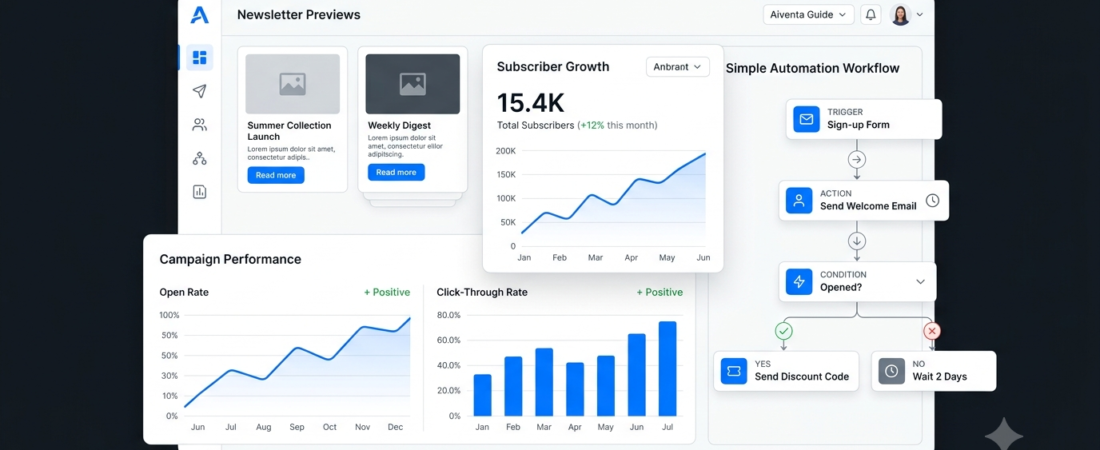
Best AI Tools for Email Marketing
AI tools for email marketing help businesses, bloggers, and creators plan campaigns, write email content, automate messages, and personalize communication with their audiences. Instead of managing every email manually, marketers can use these tools to simplify repetitive tasks and organize their campaigns more efficiently.
For example, an online store can send an automated welcome email to new subscribers, while a blogger can create a newsletter featuring recently published articles. AI-assisted features may also help generate subject lines, improve email drafts, and suggest audience segments.
However, not every platform offers the same features. Some focus on email automation, while others combine email campaigns with customer relationship management (CRM), customer segmentation, and broader marketing workflows.
In this guide, we’ll compare seven AI tools for email marketing, explain their main features, and help you choose an option that suits your business.
What Are AI Tools for Email Marketing?
AI tools for email marketing use artificial intelligence, automation, and marketing data to help users create, deliver, and analyze email campaigns.
Depending on the platform, these tools can help with:
- Drafting email content and subject lines.
- Personalizing messages for different audiences.
- Scheduling newsletters and promotional emails.
- Building automated email sequences.
- Organizing subscribers into relevant segments.
- Reviewing campaign performance.
- Testing different email versions.
AI can save time, but it does not automatically make every campaign successful. Marketers should review generated content, verify claims, and ensure messages provide genuine value to subscribers.
7 Best AI Tools for Email Marketing
1. Mailchimp — Best for Small Businesses
Mailchimp combines email marketing, audience management, campaign reporting, and automation features. Depending on the plan, businesses can use its available AI-assisted features to support campaign creation and marketing workflows.
Key features:
- Email campaign creation
- Audience segmentation
- Automated email journeys
- Campaign performance reports
- AI-assisted marketing features on supported plans
Best for: Small businesses, ecommerce stores, and creators who want to manage email campaigns from one platform.
Potential drawback: Pricing and feature limits vary by plan, and advanced automation may require a paid subscription.
2. Brevo — Best for Email and Marketing Automation
Brevo offers email marketing, contact management, and automation capabilities. It can help businesses organize campaigns and create automated communications based on supported triggers and customer activity.
Key features:
- Email campaign management
- Marketing automation workflows
- Contact segmentation
- Campaign reporting
- Additional customer communication channels
Best for: Businesses that want to combine email marketing with broader customer communication workflows.
Potential drawback: Available features and sending limits depend on the current plan.
3. ActiveCampaign — Best for Advanced Email Automation
ActiveCampaign focuses on email marketing automation and customer experience workflows. Businesses can create sequences based on subscriber behavior, campaign interactions, and other supported conditions.
Key features:
- Automated email sequences
- Contact segmentation
- Customer journey workflows
- Campaign reporting
- CRM and marketing integrations
Best for: Businesses that need more advanced email journeys and customer follow-up automation.
Potential drawback: Complex workflows can take time to plan, build, and maintain.
4. HubSpot — Best for Email Marketing and CRM
HubSpot connects marketing tools with customer relationship management features. Depending on the product and subscription, businesses can use email marketing, contact records, reporting, and AI-assisted content tools.
Key features:
- Marketing email creation
- Contact management
- Email performance reporting
- CRM-connected campaigns
- Marketing automation on supported plans
Best for: Businesses that want to connect email campaigns with sales and customer management.
Potential drawback: Advanced automation and marketing capabilities can become costly as requirements grow.
5. Kit — Best for Bloggers and Newsletter Creators
Kit, formerly known as ConvertKit, is designed for creators who want to grow an audience through email newsletters and automated sequences.
Key features:
- Newsletter publishing
- Subscriber tagging and segmentation
- Automated email sequences
- Subscriber forms and landing pages
- Creator-focused email workflows
Best for: Bloggers, newsletter publishers, and independent creators building an email audience.
Potential drawback: Businesses needing extensive enterprise reporting or complex CRM functionality may prefer a broader platform.
6. GetResponse — Best for Campaigns and Funnels
GetResponse combines email marketing with automation, landing pages, and other digital marketing features. Its capabilities can help businesses connect subscriber acquisition with follow-up campaigns.
Key features:
- Email campaign creation
- Automated email workflows
- Audience segmentation
- Landing pages and forms
- Campaign analytics
Best for: Businesses that want to connect email campaigns with lead generation and marketing funnels.
Potential drawback: The most useful automation features may depend on the subscription selected.
7. Omnisend — Best for Ecommerce Email Marketing
Omnisend focuses on ecommerce marketing and helps online stores coordinate email campaigns and supported customer messaging channels.
Key features:
- Ecommerce email campaigns
- Automated customer messages
- Audience segmentation
- Product-related marketing workflows
- Campaign reporting
Best for: Online stores that want to automate customer communication around shopping and purchasing activity.
Potential drawback: It is more specialized than general newsletter platforms, so it may not be the best fit for every blogger or service business.
AI Tools for Email Marketing Compared
| Tool | Best use | Main strength |
|---|---|---|
| Mailchimp | Small businesses | Campaign management |
| Brevo | Marketing automation | Connected customer communication |
| ActiveCampaign | Advanced workflows | Customer journey automation |
| HubSpot | CRM-connected campaigns | Marketing and contact management |
| Kit | Bloggers and creators | Newsletter-focused workflows |
| GetResponse | Marketing funnels | Campaigns and lead generation |
| Omnisend | Ecommerce stores | Ecommerce email automation |
Features, pricing, AI capabilities, and sending limits can change. Check the current plans before choosing a tool.
How to Use AI Tools for Email Marketing
1. Define Your Campaign Goal
Start with one clear objective. You might want to welcome new subscribers, share a blog post, promote a product, or re-engage an inactive audience.
Your goal should determine the email content and the metric you use to evaluate its performance.
2. Create Useful Email Content
Use AI to brainstorm subject lines, outline an email, or improve a first draft. Then edit the message to match your brand voice and provide accurate, useful information.
Avoid sending generic AI-generated emails without reviewing them.
3. Organize Your Subscribers
Segment subscribers using relevant information and preferences that you are permitted to collect. For example, a business could separate newsletter readers from customers who have requested product updates.
Do not assume every subscriber wants the same messages.
4. Automate Relevant Messages
Build simple workflows for welcome emails, requested updates, or other appropriate communications. Test each workflow before activating it.
For instance, a blog can automatically send a newsletter when new content is published, provided subscribers have agreed to receive those emails.
5. Measure and Improve Performance
Review delivery, clicks, unsubscribes, conversions, and other metrics relevant to your goals. Open rates can be affected by email privacy features, so avoid treating them as a perfect measure of reader engagement.
Use the results to test improvements gradually.
For more ideas about marketing workflows, explore our guide to AI marketing tools.
How to Choose the Best AI Tools for Email Marketing
Choose Based on Your Needs
- For small businesses: Consider Mailchimp or Brevo.
- For advanced automation: Consider ActiveCampaign.
- For CRM-connected marketing: Consider HubSpot.
- For bloggers and creators: Consider Kit.
- For marketing funnels: Consider GetResponse.
- For ecommerce stores: Consider Omnisend.
These are starting points, not universal rankings. Compare the current features and plans for your specific requirements.
Check Automation Features
Look for the ability to create the workflows you actually need. A simple newsletter may not require the same automation capabilities as a store with multiple customer journeys.
Compare Pricing and Limits
Check subscriber limits, monthly email allowances, automation restrictions, and additional charges. A low starting price may not remain the cheapest option as your audience grows.
Review Integrations and Privacy
Make sure the tool works with your website and other marketing systems. Collect subscriber information responsibly, follow applicable privacy and email marketing laws, and include the required unsubscribe options.
If you run a small company, our guide to AI tools for small business can help you explore other useful software.
Benefits of AI Email Marketing Tools
Save Time on Repetitive Tasks
Templates, automation, and AI-assisted drafting can reduce the time spent preparing routine messages.
Personalize Communication
Audience segments and supported personalization features can make emails more relevant to subscribers.
Maintain Consistent Communication
Automated workflows help businesses deliver appropriate messages without manually sending every email.
Understand Campaign Performance
Reporting features can help marketers identify which messages encourage clicks or other meaningful actions.
Support Business Growth
A well-managed email list can help businesses maintain relationships with interested subscribers and share useful updates.
However, these tools do not guarantee more sales, better deliverability, or higher engagement. Results depend on the quality of your content, subscriber consent, audience needs, and campaign execution.
Frequently Asked Questions
What are the best AI tools for email marketing?
Mailchimp, Brevo, ActiveCampaign, HubSpot, Kit, GetResponse, and Omnisend are worth comparing. The right option depends on your audience, budget, and automation requirements.
Can AI write marketing emails?
Yes. AI can help draft email copy, generate subject line ideas, and suggest improvements. Always review the result for accuracy, tone, originality, and relevance before sending it.
Are there free AI email marketing tools?
Some providers offer free plans or limited access to email marketing features. Availability, subscriber limits, and AI capabilities vary, so check each provider’s current offer.
Is email marketing useful for bloggers?
Yes. Bloggers can use newsletters to share new articles, deliver requested updates, and build relationships with readers who choose to subscribe.
Can AI automate an entire email campaign?
AI and automation features can support parts of a campaign, including drafting, segmentation, scheduling, and reporting. Human review remains important for accuracy, consent, brand voice, and campaign quality.
Conclusion
AI tools for email marketing can help businesses and creators write campaigns, organize subscribers, automate communication, and measure performance.
Mailchimp and Brevo are worth considering for small businesses, ActiveCampaign for advanced workflows, HubSpot for CRM-connected marketing, Kit for creators, GetResponse for marketing funnels, and Omnisend for ecommerce.
Start with a clear goal, choose a tool that fits your budget, and create emails that subscribers genuinely want to receive. Use analytics to improve your approach over time rather than relying on automation alone.
Explore more on Aiventa Guide: AI marketing tools and AI automation tools.