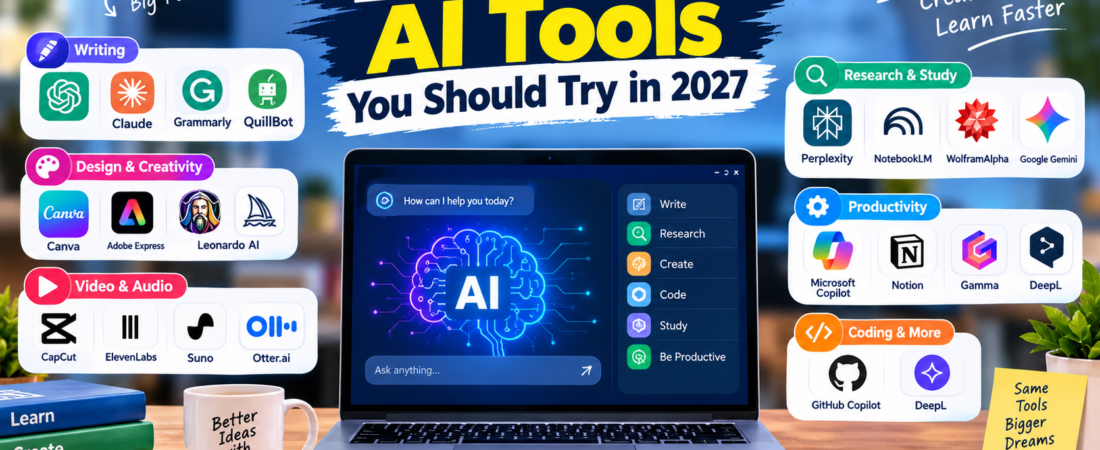
20 Best Free AI Tools You Should Try in 2027
Artificial intelligence is becoming a useful part of everyday life. Whether you are a student, content creator, freelancer, developer, business owner, or simply someone who wants to save time, there are now AI tools that can help with writing, research, design, coding, productivity, and more.
The good news is that you don’t always need to pay for an expensive subscription. Many popular AI platforms offer free plans or free access with certain limits.
In this guide, we have selected 20 of the best free AI tools you should try in 2027.
Note: Free plans, features, usage limits, and pricing can change. Always check the official website before purchasing a paid plan.
Quick Comparison
| AI Tool | Best For | Free Access |
|---|---|---|
| ChatGPT | General AI assistance | Yes |
| Google Gemini | Research & productivity | Yes |
| Claude | Writing & analysis | Yes |
| Perplexity | Research | Yes |
| Microsoft Copilot | Productivity | Yes |
| Canva | Design | Yes |
| Grammarly | Writing | Yes |
| QuillBot | Writing & paraphrasing | Yes |
| GitHub Copilot | Coding | Free options available |
| NotebookLM | Research & notes | Yes |
| Gamma | Presentations | Yes |
| Notion | Notes & productivity | Yes |
| Adobe Express | Design & content | Yes |
| CapCut | Video editing | Yes |
| ElevenLabs | AI voice | Free tier |
| Suno | AI music | Free tier |
| Leonardo AI | AI images | Free tier |
| Otter.ai | Transcription | Free tier |
| Wolfram | Alpha | Math & science |
| DeepL | Translation | Free access |
1. ChatGPT — Best Overall AI Tool
ChatGPT is one of the most versatile AI tools available. You can use it for brainstorming, learning, writing, coding, summarizing information, planning projects, and many other everyday tasks.
For example, you can ask ChatGPT to explain a difficult topic in simple language, help you brainstorm content ideas, or review a piece of writing.
Best for: Writing, learning, brainstorming, coding, and productivity.
Free access: Yes, with usage limits that can vary.
2. Google Gemini — Best for Google Users
Google Gemini can help with writing, brainstorming, research, learning, and everyday productivity.
It can be especially useful if you already use Google’s ecosystem of products.
Best for: Research, writing, productivity, and general AI assistance.
Free access: Yes.
3. Claude — Great for Writing and Analysis
Claude is an AI assistant that can help with writing, analysis, brainstorming, coding, and understanding longer pieces of information.
It is useful when you want detailed explanations or help working through complex text.
Best for: Writing, analysis, coding, and long-form content.
Free access: Yes, with limits.
4. Perplexity — Best for AI Research
Perplexity combines AI-generated answers with web research and sources. It can be useful when you want to explore a topic quickly and then check the sources behind the information.
Best for: Research, fact-finding, and discovering sources.
Free access: Yes.
5. Microsoft Copilot — Best for Productivity
Microsoft Copilot can assist with questions, writing, brainstorming, and other productivity tasks.
It is a useful option for people already working with Microsoft products and services.
Best for: Productivity, writing, research, and brainstorming.
Free access: Yes, depending on the service and account.
6. Canva — Best Free AI Design Tool
Canva is a popular design platform that also provides AI-powered features. You can use it to create presentations, social media graphics, posters, documents, and other visual content.
Best for: Graphic design, presentations, social media, and visual content.
Free access: Yes, with some features reserved for paid plans.
7. Grammarly — Best for Writing
Grammarly helps improve writing by identifying grammar, spelling, punctuation, and style issues.
It can be useful for students, professionals, bloggers, and anyone who writes regularly.
Best for: Grammar, spelling, clarity, and writing improvement.
Free access: Yes.
8. QuillBot — Best for Paraphrasing
QuillBot provides tools for rewriting and improving text. It can help you understand different ways to express an idea and improve the clarity of a draft.
Use it responsibly and make sure your final work follows the academic or professional rules that apply to you.
Best for: Paraphrasing, writing, and editing.
Free access: Yes, with limitations.
9. GitHub Copilot — Best for Coding
GitHub Copilot is designed to help developers write and understand code. It can provide coding suggestions, explanations, and assistance while working in supported development environments.
Best for: Programming, coding, and software development.
Free access: Free options may be available depending on eligibility and current plans.
10. NotebookLM — Best for Research and Notes
NotebookLM is useful for working with your own sources and documents. It can help summarize information and make studying or research easier.
This is particularly useful when you have multiple documents and want to understand the key information inside them.
Best for: Research, studying, documents, and notes.
Free access: Yes, with usage limits.
11. Gamma — Best for AI Presentations
Gamma can help you create presentations and visual documents from an idea or outline.
Instead of starting with a blank presentation, you can use AI to create an initial structure and then edit it yourself.
Best for: Presentations, documents, and visual storytelling.
Free access: Yes, with limits.
12. Notion — Best for Organization
Notion is a popular workspace for notes, projects, databases, and productivity. Its AI features can help users organize and work with their information.
Best for: Notes, project management, organization, and productivity.
Free access: Yes, with some AI features depending on the plan.
13. Adobe Express — Best for Quick Content Creation
Adobe Express provides tools for creating graphics, social media content, presentations, and other visual materials. Its AI features can help speed up parts of the creative process.
Best for: Graphics, social media, images, and marketing content.
Free access: Yes, with premium features available separately.
14. CapCut — Best for AI Video Editing
CapCut is a popular video-editing platform with AI-powered features that can help with editing, captions, effects, and content creation.
It can be useful for short-form videos and social media content.
Best for: Video editing, short videos, captions, and social media.
Free access: Yes, although some features may require a paid plan.
15. ElevenLabs — Best for AI Voice
ElevenLabs provides AI voice and audio tools that can be useful for voiceovers, narration, and other audio projects.
Best for: Voiceovers, narration, and AI audio.
Free access: A free tier is available, subject to current limits.
16. Suno — Best for AI Music
Suno allows users to create music with AI from text prompts. It can be useful for experimenting with music ideas and creative projects.
Best for: AI music and creative experimentation.
Free access: A free tier is available, subject to current limits.
17. Leonardo AI — Best for AI Images
Leonardo AI provides tools for generating and working with images using artificial intelligence.
It can be useful for creative projects, concept ideas, illustrations, and visual content.
Best for: AI image generation and creative design.
Free access: Free access is available with limits.
18. Otter.ai — Best for Transcription
Otter.ai can convert spoken conversations into text and organize transcripts. It can be useful for meetings, interviews, and lectures when recording is permitted.
Best for: Transcription, notes, meetings, and interviews.
Free access: Yes, with limits.
19. Wolfram|Alpha — Best for Math and Science
Wolfram|Alpha is a computational knowledge tool that can help with mathematics, science, and technical questions.
It is especially useful when you want to explore calculations and understand mathematical concepts.
Best for: Mathematics, science, and calculations.
Free access: Basic access is available, with additional features offered through paid plans.
20. DeepL — Best for Translation
DeepL is an AI-powered translation service that can help translate text between multiple languages.
It can be useful for students, travelers, professionals, and anyone working with multilingual content.
Best for: Translation and multilingual writing.
Free access: Yes, with limitations.
How to Choose the Right Free AI Tool
You don’t need to use all 20 tools. Start with the tool that solves your specific problem.
For writing
Try ChatGPT, Claude, Grammarly, or QuillBot.
For research
Try Perplexity or NotebookLM.
For design
Try Canva, Adobe Express, or Leonardo AI.
For video
Try CapCut.
For coding
Try GitHub Copilot.
For presentations
Try Gamma or Canva.
For audio
Try ElevenLabs or Otter.ai.
For mathematics
Try Wolfram|Alpha.
For translation
Try DeepL.
Are Free AI Tools Really Free?
Many AI platforms provide free access, but free plans usually have limitations.
These limitations may include:
- A daily or monthly usage limit
- Fewer advanced features
- Limited file uploads
- Lower generation limits
- Slower access during busy periods
- Some premium features being unavailable
Before paying for an AI tool, try its free version and decide whether the additional features are actually useful to you.
Can AI Tools Replace Human Work?
AI tools can save time and help you work more efficiently, but they should not replace human judgment.
AI can sometimes produce incorrect, outdated, or misleading information. Always review important information and verify facts from reliable sources.
For school or college work, follow your institution’s rules regarding AI-generated content.
Frequently Asked Questions
What are the best free AI tools in 2027?
Some useful free AI tools include ChatGPT, Gemini, Claude, Perplexity, Canva, Grammarly, NotebookLM, and Microsoft Copilot. The best option depends on what you want to accomplish.
Which free AI tool is best for students?
ChatGPT, Gemini, NotebookLM, Perplexity, and Grammarly can be useful for different study and writing tasks.
Are free AI tools safe to use?
Most major AI services have security and privacy policies, but you should still avoid entering passwords, financial information, or other sensitive personal information unless you understand how the service handles that data.
Can I use these AI tools for business?
Many can be used for business-related tasks, but commercial usage rights and restrictions can differ between tools and plans. Check the individual tool’s terms before using generated content commercially.
Do I need to pay for AI tools?
No. Many AI tools provide free access. Paid plans can provide higher limits or additional features, but they aren’t always necessary.
Which AI tool is best for content creation?
ChatGPT, Claude, Canva, Adobe Express, CapCut, ElevenLabs, and Leonardo AI can all be useful for different parts of the content-creation process.
Final Thoughts
You don’t need dozens of expensive subscriptions to start using artificial intelligence.
The 20 free AI tools in this guide cover a wide range of tasks, including writing, research, studying, design, video editing, coding, productivity, audio, and translation.
Start with one or two tools that match your needs, learn how to use them effectively, and expand your toolkit as you discover new use cases.
Which free AI tool is your favorite? Share your experience and let us know which tool we should review next.
Related Aiventa Guide Articles
Add these internal links as your other articles are published:
- 15 Best AI Tools for Students in 2026 →
/best-ai-tools-for-students/ - 10 Best AI Writing Tools in 2026 →
/best-ai-writing-tools/ - 15 Best AI Tools for Content Creators →
/best-ai-tools-for-content-creators/ - 10 Best AI Image Generators →
/best-ai-image-generators/
Affiliate Opportunity
For this article, you can later add official affiliate links where an AI company’s affiliate/referral program is actually available and you are accepted into it.
Don’t label a normal official link as an affiliate link. Add a clear disclosure if the article contains affiliate links.