
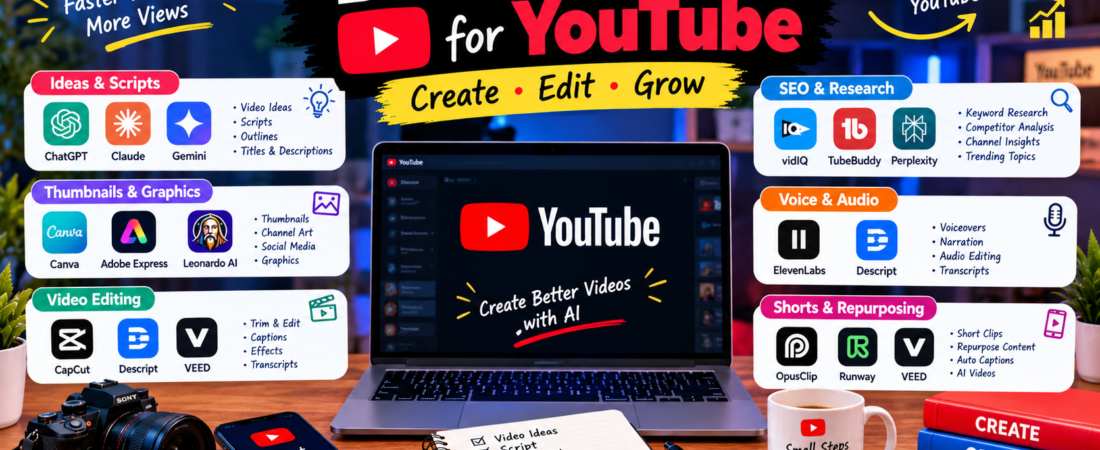
Growing a YouTube channel involves much more than simply uploading videos. You need good ideas, research, scripts, thumbnails, editing, titles, descriptions, and a consistent publishing workflow.
Fortunately, AI tools for YouTube can help with many of these tasks.
From generating video ideas to improving thumbnails and turning long videos into short clips, the right tools can save creators significant time.
In this guide, we cover 15 of the best AI tools for YouTube and explain what each one is useful for.
Note: Features and pricing can change over time. Check each tool’s official website before purchasing a paid plan.
Quick Comparison
| Tool | Best For | Free Option |
|---|---|---|
| ChatGPT | Ideas and scripts | Yes |
| Canva | Thumbnails and graphics | Yes |
| CapCut | Video editing | Yes |
| vidIQ | YouTube SEO and research | Yes |
| TubeBuddy | Channel optimization | Yes |
| Claude | Long-form scripts | Yes |
| Gemini | Research and ideas | Yes |
| Descript | Video and podcast editing | Yes |
| ElevenLabs | Voiceovers | Limited |
| Runway | AI video creation | Limited |
| OpusClip | Shorts and clips | Limited |
| Perplexity | Research | Yes |
| Adobe Express | Thumbnails and graphics | Yes |
| VEED | Online video editing | Yes |
| Gamma | Presentations and visual content | Yes |
1. ChatGPT – Best for YouTube Ideas and Scripts
ChatGPT is a versatile AI assistant that can help YouTubers with almost every stage of content planning.
For example, you can ask it for video ideas, outlines, hooks, scripts, titles, descriptions, and content calendars.
Best for:
- Video ideas
- YouTube scripts
- Video hooks
- Titles
- Descriptions
- Content planning
Instead of starting with a blank document, you can use AI to create a first draft and then add your own knowledge and experience.
Official website: https://chatgpt.com/
2. Canva – Best for YouTube Thumbnails
A good thumbnail can help communicate what a video is about before someone clicks on it.
Canva makes it easier to create YouTube thumbnails without advanced graphic-design skills.
Best for:
- YouTube thumbnails
- Channel banners
- Social media graphics
- Video graphics
- Presentations
You can start with a template and customize the text, images, and layout for your channel.
Official website: https://www.canva.com/
3. CapCut – Best for Video Editing
CapCut provides a range of video-editing features that are useful for YouTube creators.
It can help with cutting clips, captions, effects, transitions, and other editing tasks.
Best for:
- YouTube videos
- YouTube Shorts
- Captions
- Social media videos
- Basic editing
For creators who publish frequently, a simple editing workflow can make content production much faster.
Official website: https://www.capcut.com/
4. vidIQ – Best for YouTube SEO
vidIQ focuses specifically on YouTube growth, keyword research, content ideas, and channel optimization.
Current guides describe its keyword research and competitor-analysis features as useful for finding topics and search opportunities. VidIQ
Best for:
- Keyword research
- Video ideas
- YouTube SEO
- Competitor research
- Channel insights
However, keyword scores are estimates rather than guarantees of rankings. Use them as one signal alongside the actual search results and your audience data.
Official website: https://vidiq.com/
5. TubeBuddy – Best for Channel Optimization
TubeBuddy provides tools designed specifically for YouTube creators.
Its features can help with keyword research, optimization, testing, and managing parts of a YouTube workflow.
Best for:
- YouTube SEO
- Keyword research
- Video optimization
- Channel management
- Thumbnail testing
Therefore, it can be useful for creators who want more data while planning and optimizing videos.
Official website: https://www.tubebuddy.com/
6. Claude – Best for Long YouTube Scripts
Claude can be useful when you need to organize and develop longer pieces of text.
You can use it to brainstorm topics, create detailed outlines, develop scripts, and improve existing drafts.
Best for:
- Long-form scripts
- Storytelling
- Research organization
- Video outlines
- Editing
For educational or documentary-style videos, a structured script can make the production process easier.
Official website: https://claude.ai/
7. Google Gemini – Best for Research and Brainstorming
Gemini can help YouTubers explore topics and develop content ideas.
Best for:
- Research assistance
- Brainstorming
- Video ideas
- Summaries
- Content planning
For instance, you can use it to create a list of questions your audience may have about a particular topic.
Official website: https://gemini.google.com/
8. Descript – Best for Video and Podcast Editing
Descript combines video and audio editing with a transcript-based workflow.
This can be particularly useful for talking-head videos, interviews, tutorials, and podcasts.
Best for:
- Video editing
- Podcast editing
- Transcripts
- Captions
- Interviews
Because you can work with the transcript, editing spoken content can feel more like editing a document.
Official website: https://www.descript.com/
9. ElevenLabs – Best for AI Voiceovers
ElevenLabs focuses on AI-powered voice and audio generation.
YouTube creators can use voice technology for narration and other audio projects where appropriate.
Best for:
- Voiceovers
- Narration
- Storytelling
- Audio content
However, always check the service’s current terms and usage rights before publishing generated voices commercially.
Official website: https://elevenlabs.io/
10. Runway – Best for AI Video Creation
Runway provides AI-powered tools for creating and working with video.
It can be useful for creators who want to experiment with visual effects and AI-generated video concepts.
Best for:
- AI video
- Visual effects
- Creative projects
- Video experiments
For creators working on visually creative videos, these features can add another layer to the production process.
Official website: https://runwayml.com/
11. OpusClip – Best for Turning Long Videos Into Shorts
One long YouTube video can contain several useful short clips.
OpusClip is designed to help creators repurpose longer videos into shorter content.
Best for:
- YouTube Shorts
- Short clips
- Podcasts
- Content repurposing
For example, a long interview could potentially become several short videos for your channel.
Official website: https://www.opus.pro/
12. Perplexity – Best for YouTube Research
Research is an important part of creating informative YouTube content.
Perplexity can help you explore topics, find information, and develop research questions before writing your script.
Best for:
- Topic research
- Fact discovery
- Content ideas
- Research questions
Nevertheless, important claims should still be checked against reliable primary or official sources before publishing.
Official website: https://www.perplexity.ai/
13. Adobe Express – Best for YouTube Graphics
Adobe Express can help creators produce graphics and visual content without needing advanced design software.
Best for:
- Thumbnails
- Channel graphics
- Social media posts
- Banners
- Promotional content
It can be a useful alternative if you want another design workflow besides Canva.
Official website: https://www.adobe.com/express/
14. VEED – Best Browser-Based Video Editor
VEED is an online video editing platform that works directly in a web browser.
Best for:
- Video editing
- Captions
- Screen recordings
- Social media videos
- YouTube content
Since the workflow is browser-based, it can be convenient when you want to edit without installing traditional desktop software.
Official website: https://www.veed.io/
15. Gamma – Best for Visual Explanations
Gamma can help turn information and ideas into structured visual presentations.
For YouTubers, this can be useful when creating educational content, presentations, or visual explanations.
Best for:
- Educational videos
- Presentations
- Visual explanations
- Business content
- Content planning
For example, you could use a visual presentation as part of a tutorial or educational video.
Official website: https://gamma.app/
Best AI Tools for Different YouTube Tasks
Different tasks require different tools. Here is a simple breakdown.
Best AI Tools for YouTube Scripts
ChatGPT and Claude are useful for brainstorming, outlines, hooks, and scripts.
Best AI Tools for YouTube SEO
vidIQ and TubeBuddy are specifically designed around YouTube optimization and keyword research. The Creator Pilot
Best AI Tools for YouTube Thumbnails
Canva and Adobe Express are useful for creating thumbnail designs.
Best AI Tools for YouTube Editing
CapCut, Descript, and VEED can help with different editing workflows.
Best AI Tools for YouTube Voiceovers
ElevenLabs can be useful for AI-generated narration and voice projects.
Best AI Tools for YouTube Shorts
CapCut and OpusClip can help create or repurpose short-form videos.
How to Use AI for YouTube
AI works best when you use it as part of a complete workflow.
Step 1: Find a Topic
Start by identifying a topic that is relevant to your audience.
You can use YouTube search suggestions, your own analytics, and keyword research tools to discover potential topics.
Step 2: Research the Topic
Next, research the subject and verify important information.
Tools such as Perplexity and Gemini can help with the research process.
Step 3: Create an Outline
Once you understand the topic, create a clear structure for the video.
ChatGPT or Claude can help organize the main points.
Step 4: Write the Script
Create a first draft and then add your own examples, experience, and opinions.
That extra human input helps make the video more useful and distinctive.
Step 5: Create the Thumbnail
Use Canva or Adobe Express to create a clear thumbnail.
Keep the design simple enough to understand quickly.
Step 6: Edit the Video
Use CapCut, Descript, VEED, or another editor that fits your workflow.
Add captions and remove unnecessary sections where appropriate.
Step 7: Optimize the Video
Before publishing, review your title, description, thumbnail, and overall presentation.
YouTube SEO tools can provide additional suggestions, but no tool can guarantee a ranking.
Step 8: Analyze the Results
After publishing, review your actual YouTube Analytics.
Look at metrics such as impressions, click-through rate, watch time, audience retention, and viewer behavior.
Then use those insights to improve your next video.
Can AI Help a New YouTube Channel?
Yes. AI can reduce the amount of time required for repetitive tasks.
However, AI does not automatically create a successful channel.
A new creator still needs:
- Useful topics
- Original ideas
- Good storytelling
- Strong thumbnails
- Consistent publishing
- Audience understanding
- Quality videos
Therefore, think of AI as a productivity tool rather than a shortcut to guaranteed views.
Are AI Tools for YouTube Free?
Many tools offer free plans or limited free features.
However, advanced features may require a subscription or credits.
Before paying for a tool, try its free features first. This lets you determine whether it actually improves your workflow.
A Simple Free YouTube AI Workflow
If you are starting with a small budget, you do not need dozens of subscriptions.
A simple setup could be:
Research: Perplexity or Gemini
Ideas & scripts: ChatGPT
Thumbnail: Canva
Editing: CapCut
Analytics: YouTube Studio
As your channel grows, you can add specialized tools for SEO, voiceovers, repurposing, or advanced editing.
Frequently Asked Questions
What are the best AI tools for YouTube?
Some useful options include ChatGPT, Canva, CapCut, vidIQ, TubeBuddy, Claude, Gemini, Descript, ElevenLabs, Runway, and OpusClip. The best choice depends on the task you want to automate or improve.
What is the best AI tool for YouTube scripts?
ChatGPT and Claude are strong general-purpose options for brainstorming and developing scripts. You should still review the output and add your own ideas.
What is the best AI tool for YouTube thumbnails?
Canva and Adobe Express are useful options for creating YouTube thumbnails. The most important thing is that the final thumbnail clearly communicates the video’s topic.
Can AI help with YouTube SEO?
Yes. Tools such as vidIQ and TubeBuddy can help with keyword research and optimization. However, SEO tools provide guidance rather than a guarantee of rankings. The Creator Pilot
Can AI edit YouTube videos?
Yes. Tools such as CapCut, Descript, and VEED can assist with video editing, captions, transcripts, and other production tasks.
Can AI create YouTube Shorts?
AI can help create and repurpose short-form videos. For example, OpusClip focuses on turning longer videos into shorter clips.
Should I use AI to make my entire YouTube channel?
It is better to use AI selectively. Let AI handle repetitive tasks while you focus on original ideas, storytelling, research, and connecting with your audience.
Final Thoughts
The best AI tools for YouTube are not necessarily the tools with the most features.
Instead, choose tools based on the specific problems you want to solve.
For example, ChatGPT can help with ideas and scripts, Canva can support thumbnails, while CapCut can help with editing. Meanwhile, vidIQ and TubeBuddy can assist with YouTube SEO and research.
Most importantly, do not rely on AI alone.
Your ideas, creativity, research, storytelling, and understanding of your audience are what make a YouTube channel different.
Use AI to save time and improve your workflow. Then use your own judgment to turn that assistance into genuinely useful content.
More AI Guides From Aiventa Guide
- 15 Best AI Tools for Students
- 20 Best Free AI Tools You Should Try
- 10 Best AI Writing Tools
- 15 Best AI Tools for Content Creators
- 15 Best AI Tools for Productivity
Affiliate Disclosure
Some links on Aiventa Guide may be affiliate links. If you purchase a product or service through an eligible affiliate link, we may earn a commission at no additional cost to you.