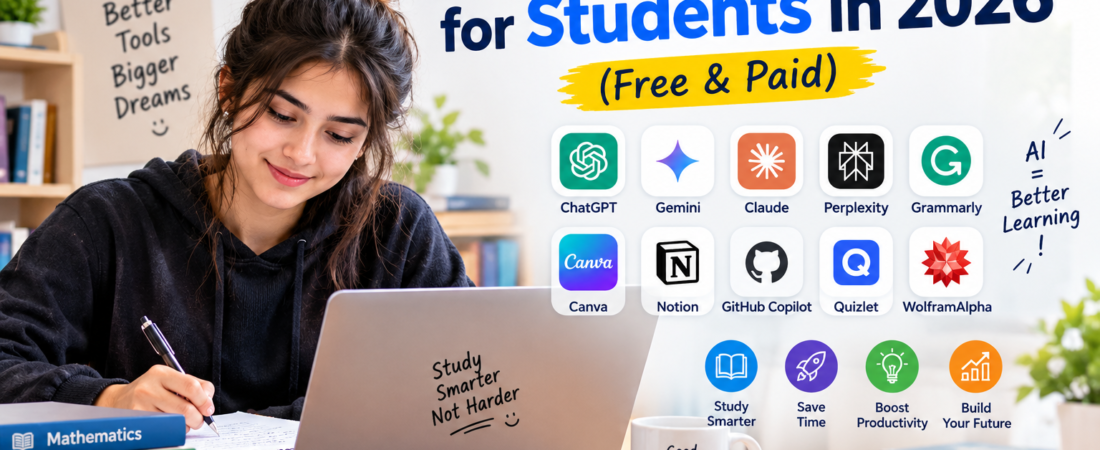
15 Best AI Tools for Students in 2026
Artificial intelligence is changing the way students study, research, write, create presentations, and learn new subjects. The right AI tool can help you understand difficult topics, organize your notes, improve your writing, and save time.
However, AI should be used as a learning assistant, not as a replacement for your own work. Always check your school’s or college’s rules before using AI for assignments and exams.
In this guide, we have selected 15 useful AI tools for students in 2026, including free and paid options.
Quick Comparison
| AI Tool | Best For | Free Option |
|---|---|---|
| ChatGPT | Learning & general help | Yes |
| Google Gemini | Research & study | Yes |
| Claude | Writing & explanations | Yes |
| Gemini Notebook | Notes & research | Yes |
| Perplexity | Research | Yes |
| Grammarly | Writing & grammar | Yes |
| QuillBot | Paraphrasing & writing | Yes |
| Canva | Presentations & designs | Yes |
| Gamma | AI presentations | Yes |
| GitHub Copilot | Coding | Yes |
| Notion AI | Notes & productivity | Limited |
| Microsoft Copilot | Productivity | Yes |
| Wolfram Alpha | Math & science | Limited |
| Quizlet | Flashcards & revision | Limited |
| Otter.ai | Meeting & lecture notes | Limited |
Free plans and features can change, so check the official website before purchasing any subscription.
1. ChatGPT — Best Overall AI Tool for Students
ChatGPT is one of the most versatile AI tools for students. You can use it to understand difficult concepts, brainstorm ideas, summarize information, practice questions, improve drafts, and learn coding.
Instead of asking AI to simply give you an answer, try asking it to explain the topic step-by-step.
Best for: Studying, explanations, brainstorming, coding, and writing help.
Free option: Yes.
Tip: Ask ChatGPT to act as a tutor and explain concepts in simple language.
2. Google Gemini — Best for Google Users
Google Gemini can help students with research, writing, brainstorming, explanations, and everyday study tasks. Google’s current India plans include a free tier, while paid plans provide additional access and features. Gemini
Best for: Research, studying, writing, and Google ecosystem users.
Free option: Yes.
3. Claude — Great for Writing and Explanations
Claude is useful for students who work with longer pieces of text. It can help explain difficult material, review writing, brainstorm ideas, and assist with coding.
Best for: Long documents, writing feedback, explanations, and coding.
Free option: Yes.
4. Gemini Notebook — Best for Studying Your Own Notes
Gemini Notebook can help students work with their own study materials. You can use your notes and other sources to create summaries, study guides, quizzes, and other learning materials.
This makes it particularly useful when preparing for a test from your own course material.
Best for: Notes, PDFs, research, summaries, and revision.
Free option: Yes, with limits that can vary.
5. Perplexity — Best for AI-Powered Research
Perplexity is designed for research and provides answers with sources that you can check. This can be useful when you need to investigate a topic and follow the information back to its sources.
Best for: Research, fact-checking, and finding sources.
Free option: Yes.
Student tip: Always open and verify important sources instead of blindly trusting an AI answer.
6. Grammarly — Best for Writing
Grammarly can help students find grammar, spelling, punctuation, and style problems in their writing.
It can be useful when polishing essays, emails, applications, and other drafts.
Best for: Grammar, spelling, clarity, and writing improvement.
Free option: Yes.
7. QuillBot — Best for Improving Drafts
QuillBot provides writing and paraphrasing tools that can help students improve the clarity of their drafts.
Use it to understand different ways of expressing an idea, but make sure the final work represents your own understanding and follows your school’s academic-integrity rules.
Best for: Writing improvement and paraphrasing.
Free option: Yes, with limitations.
8. Canva — Best for Presentations and Visual Projects
Canva is useful for students who need to create presentations, posters, documents, and other visual projects.
Its AI features can help with brainstorming and creating content, while its design tools make it easier to turn ideas into presentations.
Best for: Presentations, posters, graphics, and visual projects.
Free option: Yes.
9. Gamma — Best for AI Presentations
Gamma can help turn an idea or outline into a presentation. It can save time when creating the initial structure of a project.
You should still review the generated information and customize the presentation before submitting or presenting it.
Best for: Presentations and visual documents.
Free option: Yes, with limits.
10. GitHub Copilot — Best for Coding Students
Students learning programming can use GitHub Copilot for coding assistance, explanations, and suggestions inside supported development environments.
It can be particularly helpful when learning how code works, but students should understand and review any code generated by AI.
Best for: Programming and coding practice.
Free option: Available in certain plans and eligibility programs.
11. Notion AI — Best for Notes and Organization
Notion combines notes, documents, databases, and productivity features. Its AI capabilities can help students organize information, summarize content, and work with their notes.
Best for: Note-taking, organization, and productivity.
Free option: Notion offers a free plan, while AI access can depend on the current plan.
12. Microsoft Copilot — Best for Microsoft Users
Microsoft Copilot can be useful for students who already use Microsoft products. Depending on the version and account, Copilot can assist with writing, brainstorming, research, and productivity.
Best for: Microsoft users, writing, research, and productivity.
Free option: Yes, depending on the service and account.
13. Wolfram|Alpha — Best for Math and Science
Wolfram|Alpha is a powerful computational knowledge tool that can help with mathematics, science, and other technical subjects.
It can be especially useful when you want to understand how a mathematical problem is approached rather than simply copying an answer.
Best for: Mathematics, science, calculations, and technical learning.
Free option: Basic access is available, with additional features available through paid plans.
14. Quizlet — Best for Flashcards and Revision
Quizlet can help students review information using flashcards and study activities.
It can be useful for vocabulary, definitions, formulas, and quick revision before a test.
Best for: Flashcards, memorization, and revision.
Free option: Yes, with additional features available through paid plans.
15. Otter.ai — Best for Notes and Transcription
Otter.ai can turn spoken conversations into text and can help organize information from meetings or lectures where recording is permitted.
Always make sure you have the required permission before recording another person’s speech.
Best for: Transcription, meeting notes, and organizing spoken information.
Free option: Yes, with limits.
Which AI Tool Is Best for Students?
There is no single AI tool that is perfect for every student.
- Best overall: ChatGPT
- Best for Google users: Gemini
- Best for long documents: Claude
- Best for studying your own notes: Gemini Notebook
- Best for research: Perplexity
- Best for grammar: Grammarly
- Best for presentations: Canva or Gamma
- Best for coding: GitHub Copilot
- Best for mathematics: Wolfram|Alpha
- Best for flashcards: Quizlet
The best choice depends on what you are trying to accomplish.
How to Use AI Tools for Studying
AI works best when you use it as a learning partner.
Try asking an AI tool to:
- Explain a difficult topic in simple language.
- Give you practice questions.
- Create a quiz from your notes.
- Explain why an answer is correct.
- Help you identify gaps in your understanding.
- Review your draft and suggest improvements.
- Create a study plan for an upcoming test.
Avoid submitting AI-generated work as your own when your school or college does not allow it.
Are AI Tools Free for Students?
Many AI tools offer free versions, but free plans often have usage limits or fewer features.
For example, Google currently offers a free Gemini tier in India, while its paid plans provide higher usage limits and additional features. Gemini
Before paying for an AI subscription, try the free version first and decide whether you actually need the additional features.
Frequently Asked Questions
What is the best AI tool for students?
ChatGPT is one of the most versatile choices because it can help with explanations, brainstorming, writing, coding, and study practice.
Which AI tool is best for research?
Perplexity and Gemini Notebook can be useful for research, but important information should always be checked against reliable sources.
Can students use AI for assignments?
That depends on the rules of your school or college. Always follow your institution’s academic-integrity policy.
Are AI tools free for students?
Many AI tools have free plans. However, features, usage limits, and prices vary between services and can change over time.
Can AI replace studying?
No. AI can make studying easier, but understanding and remembering the material still requires active learning and practice.
What is the best free AI tool for students?
There is no single best option for everyone. ChatGPT, Gemini, Gemini Notebook, Perplexity, and several other tools offer free access with different capabilities and limits.
Final Thoughts
AI tools can make studying, research, writing, presentations, coding, and revision much easier. However, the goal should not be to let AI do everything for you.
The best approach is to use AI to learn faster, understand difficult concepts, practice more effectively, and improve your own work.
Start with a few free tools that match your needs instead of paying for multiple subscriptions at once. As your needs grow, you can decide whether a premium plan is worth the cost.
Which AI tool do you use most for studying? Let us know in the comments.
Related Guides on Aiventa Guide
- [AI Tools] — Explore useful AI tools and software.
- [AI Tool Reviews] — Detailed reviews of popular AI tools.
- [AI Tool Comparisons] — Compare AI tools before choosing one.
- [AI Guides] — Practical guides for using AI and software.
Replace the four links above with the actual Aiventa Guide URLs after those pages/articles are published.
Affiliate Disclosure
Some articles on Aiventa Guide may contain affiliate links. If you purchase a product or service through an eligible affiliate link, we may receive a commission at no additional cost to you. We only recommend tools that we believe may be useful to our readers.