
AI Contract Tools: 7 Tools to Manage Agreements
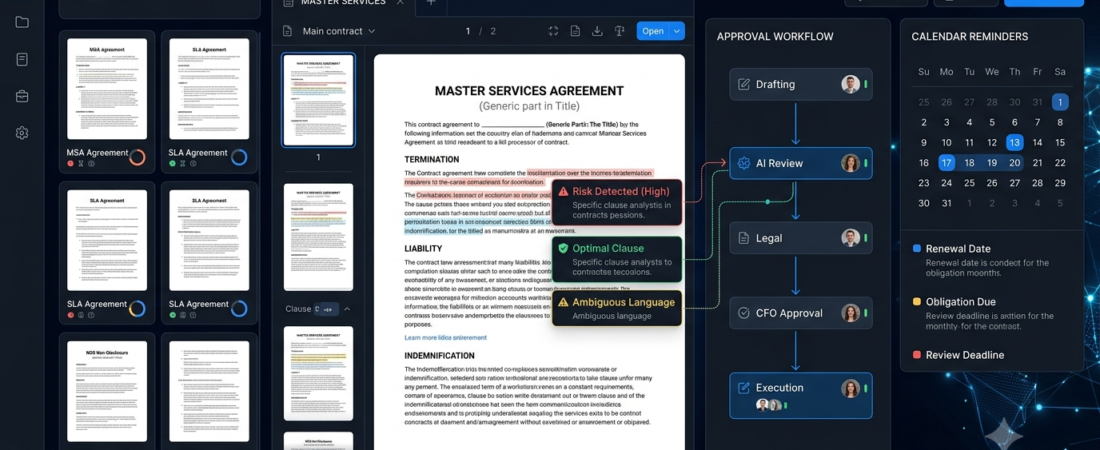
AI contract tools help businesses organize agreements, identify important clauses, review documents, and manage contract workflows. Instead of manually searching through every page, teams can use AI-assisted software to locate key information and reduce repetitive administrative work.
Contracts are important for freelancers, agencies, startups, and established businesses. However, tracking renewal dates, payment terms, obligations, and changes across multiple documents can become difficult as a company grows.
In this guide, we compare seven contract management platforms, explain their main features, and show how to choose a suitable option for your business. AI can assist with contract work, but important legal decisions should still receive qualified human review.
What Are AI Contract Tools?
AI contract tools are software applications that use artificial intelligence, document analysis, search, or workflow automation to help people manage agreements.
Depending on the platform, they may help users:
- Search for specific terms across contracts.
- Summarize lengthy agreements.
- Identify clauses that need additional review.
- Compare contract versions.
- Track renewal dates and obligations.
- Automate approval and signature workflows.
- Organize agreements in a searchable repository.
Some products focus on analyzing contract language, while others specialize in document storage, electronic signatures, or lifecycle management. Therefore, choose a platform based on the work you actually need to perform.
7 AI Contract Tools to Consider
1. Juro — Contract Management for Growing Teams
Juro offers contract management software designed to help businesses create, negotiate, sign, and manage agreements in a more organized workflow.
Best for: Growing companies that want to manage contracts in one place.
Key benefits:
- Supports contract creation and collaboration.
- Helps organize agreements and related information.
- Provides workflow capabilities for contract processes.
- Offers AI-related functionality within its product ecosystem.
Potential limitation: Features, integrations, and pricing depend on the plan and business requirements. Confirm that the available AI capabilities cover your specific workflow.
2. Ironclad — Digital Contract Lifecycle Management
Ironclad focuses on digital contract lifecycle management, supporting contract processes from creation and negotiation through execution and ongoing management.
Best for: Legal departments and businesses with structured contract approval processes.
Key benefits:
- Helps manage contract workflows.
- Supports collaboration during review and negotiation.
- Provides a centralized approach to agreement management.
- Offers AI-powered capabilities for supported tasks.
Potential limitation: It may be more suitable for organizations with established contract processes than for individuals managing only a few agreements.
3. Icertis — Enterprise Contract Intelligence
Icertis provides enterprise contract lifecycle management software for organizations that manage complex agreements across departments, suppliers, and business partners.
Best for: Large organizations with complex contract requirements.
Key benefits:
- Helps manage large contract portfolios.
- Supports contract data and obligation management.
- Provides enterprise workflow capabilities.
- Can help teams find and analyze information across agreements.
Potential limitation: Enterprise deployments can require significant planning, integration work, and investment.
4. ContractPodAi — AI-Assisted Legal Operations
ContractPodAi focuses on contract lifecycle management and legal operations. Its platform is designed to support legal teams with contract workflows and AI-assisted document work.
Best for: Legal teams seeking a more integrated approach to contract management.
Key benefits:
- Supports contract-related workflows.
- Helps organize agreements and associated information.
- Offers AI-oriented capabilities for legal work.
- Can support collaboration between legal and business teams.
Potential limitation: Buyers should assess its current product capabilities, implementation needs, and suitability for their legal processes.
5. DocuSign — Electronic Signatures and Agreement Workflows
DocuSign is widely associated with electronic signatures and digital agreement workflows. Depending on the products selected, businesses can manage signature processes and related agreement activities.
Best for: Businesses that need digital signing and agreement execution.
Key benefits:
- Supports electronic signing workflows.
- Helps track document signature status.
- Reduces the need for printing and scanning.
- Offers additional agreement-management capabilities through supported products.
Potential limitation: Electronic signatures alone do not provide complete contract analysis or legal review. Additional capabilities may require separate plans.
6. SpotDraft — Contract Workflows for Businesses
SpotDraft provides contract lifecycle management software designed to help legal and business teams handle agreement-related processes.
Best for: Businesses looking to improve contract creation, review, and tracking workflows.
Key benefits:
- Helps centralize contract information.
- Supports workflow automation.
- Helps organize review and approval processes.
- Provides AI-related features for supported contract tasks.
Potential limitation: The value depends on how well the platform fits existing systems and the complexity of the company’s contracts.
7. LinkSquares — Contract Analysis and Management
LinkSquares offers contract lifecycle management and contract analysis capabilities for businesses. Its tools can help legal and business teams organize agreements and extract useful information from contract repositories.
Best for: Legal departments that need visibility into existing agreements.
Key benefits:
- Helps organize contract repositories.
- Supports contract search and analysis.
- Helps teams review important agreement information.
- Provides tools for managing contract-related processes.
Potential limitation: Teams should verify supported document types, AI capabilities, integrations, and current pricing before selecting a plan.
AI Contract Tools Compared
| Tool | Main focus | Best suited for |
|---|---|---|
| Juro | Contract creation and management | Growing businesses |
| Ironclad | Contract lifecycle workflows | Legal and business teams |
| Icertis | Enterprise contract management | Large organizations |
| ContractPodAi | Legal operations | Legal departments |
| DocuSign | Electronic signatures | Businesses signing agreements |
| SpotDraft | Contract workflows | Growing companies |
| LinkSquares | Contract analysis and management | Legal teams |
This table is a starting point, not a definitive ranking. Products differ in the contracts they support, their AI capabilities, integrations, and pricing.
How AI Contract Tools Can Improve Productivity
1. Find Important Contract Terms
AI-assisted search can help teams locate information such as payment conditions, termination provisions, renewal dates, and responsibilities.
For example, a business reviewing multiple supplier agreements could use supported search or extraction features to identify contracts containing specific renewal terms.
The results should be checked against the original contract before anyone acts on them.
2. Summarize Lengthy Agreements
A contract summary can help a reviewer understand the document’s structure and identify sections that need closer attention.
However, summaries may omit exceptions, qualifications, or important details. Never treat a summary as a replacement for reading relevant clauses or obtaining legal advice when needed.
3. Track Renewal Dates and Obligations
Contract management systems can help teams organize renewal dates, responsibilities, and key milestones. Where supported, reminders and automated workflows can reduce the chance of overlooking an important deadline.
4. Organize Contract Approvals
Workflow tools can route agreements to the appropriate reviewers and record progress through the approval process. This can make it easier to understand which contracts need attention.
Businesses can also explore our guide to AI automation tools for more ways to automate repetitive processes.
How to Choose the Right AI Contract Tools
Before choosing a platform, consider these factors.
1. Define your main need. Decide whether you need electronic signatures, contract review, clause search, renewal tracking, or full contract lifecycle management.
2. Check AI capabilities. Confirm which tasks the product actually automates. Do not assume every platform can identify every legal risk accurately.
3. Review security controls. Contracts may contain confidential commercial or personal information. Check access controls, data retention, security documentation, and the provider’s AI data-handling policies.
4. Check integrations. Consider whether the tool works with your document storage, CRM, e-signature system, and existing approval processes.
5. Compare total costs. Review subscriptions, user limits, implementation, integrations, and additional features.
6. Test with representative contracts. Use an approved sample set and compare the AI’s output with a careful human review.
7. Keep legal oversight. AI can help identify issues, but it cannot guarantee that a contract is enforceable, complete, or appropriate for your jurisdiction.
For a broader approach to selecting software, read our guide on how to choose AI tools.
Common Mistakes to Avoid
AI contract tools are most useful when they support a clear and well-managed process. Avoid these mistakes:
- Accepting AI output without checking it: Confirm important clauses and dates in the original document.
- Uploading confidential agreements carelessly: Follow your organization’s security policies and review the provider’s data terms.
- Assuming all platforms offer the same features: Contract analysis, e-signatures, and lifecycle management are different capabilities.
- Ignoring version control: Make sure reviewers are working with the correct contract version.
- Automating every approval immediately: Test workflows and define clear responsibilities first.
- Treating AI as a lawyer: Seek qualified legal advice for legal interpretation, negotiation, or high-stakes decisions.
Frequently Asked Questions
What are AI contract tools used for?
They can help organize agreements, search for clauses, summarize documents, track obligations, manage approvals, and support contract-related workflows.
Can AI review a contract?
Some tools can analyze contract language and highlight terms for review. However, they may miss context or misinterpret clauses. Important agreements should be reviewed by an appropriately qualified professional.
Are AI contract tools suitable for small businesses?
Yes. A small business may benefit from digital signatures, a searchable contract repository, or renewal reminders. A full enterprise platform may be unnecessary if contract volume is low.
Can AI identify risky contract clauses?
Some platforms can flag clauses based on configured rules, templates, or supported AI capabilities. These flags are prompts for review, not guarantees that a clause is legally risky or safe.
Are AI contract tools secure?
Security varies by provider and configuration. Review access controls, retention policies, encryption information, and how submitted data may be processed before uploading confidential agreements.
Conclusion
AI contract tools can help businesses organize agreements, locate key information, coordinate approvals, and track important dates. Juro, Ironclad, Icertis, ContractPodAi, DocuSign, SpotDraft, and LinkSquares serve different contract-related needs.
Start by identifying the most time-consuming part of your contract process. Test a suitable platform with approved documents, verify its results, and maintain appropriate human and legal oversight.
Explore Aiventa Guide for more practical AI software guides covering business tools, productivity, and automation.
Useful Resources
- Official Juro website: https://juro.com/
- Official DocuSign website: https://www.docusign.com/