
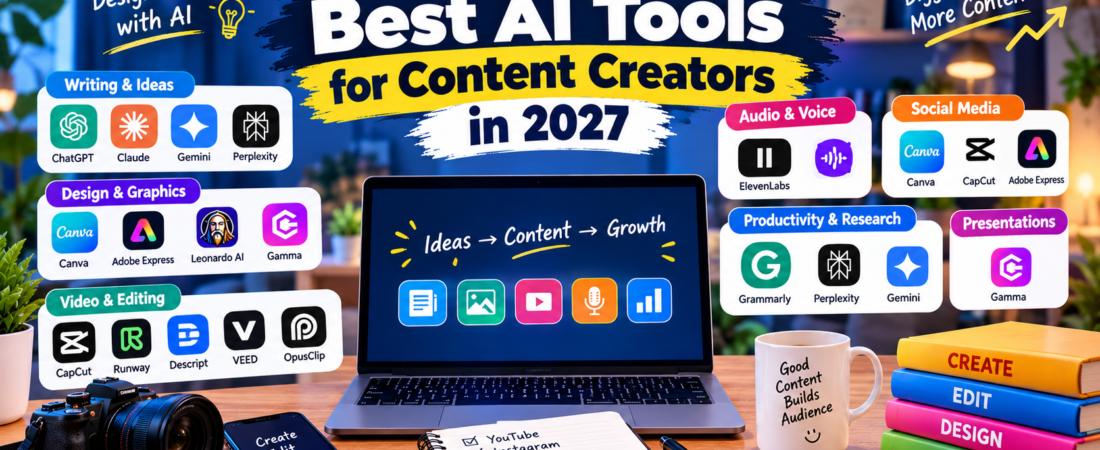
Creating high-quality content takes time. First, you need an idea. Then, you may have to research the topic, write a script, create visuals, edit videos, and publish everything.
Fortunately, modern AI tools for content creators can make many of these tasks faster and easier.
In this guide, we have selected 15 of the best AI tools for content creators in 2027. These tools cover writing, images, video, audio, research, design, and productivity.
Whether you are a YouTuber, blogger, Instagram creator, freelancer, or beginner, you can find useful options here.
Note: AI features, pricing, and availability can change. Check the official website before purchasing a paid plan.
Quick Comparison: Best AI Tools for Creators
| Tool | Best For | Free Option |
|---|---|---|
| ChatGPT | Ideas, scripts and writing | Yes |
| Canva | Graphics and thumbnails | Yes |
| CapCut | Video editing | Yes |
| Adobe Express | Social media design | Yes |
| Claude | Long-form writing | Yes |
| Google Gemini | Research and ideas | Yes |
| Runway | AI video creation | Limited |
| ElevenLabs | AI voice and audio | Limited |
| Descript | Video and podcast editing | Yes |
| Leonardo AI | AI images | Yes |
| Gamma | Presentations | Yes |
| VEED | Online video editing | Yes |
| OpusClip | Short-form video | Limited |
| Grammarly | Writing and editing | Yes |
| Perplexity | Research | Yes |
1. ChatGPT – Best Overall AI Tool for Creators
ChatGPT is one of the most versatile AI creator tools available today. It can help with brainstorming, scripts, captions, outlines, blog posts, content calendars, and much more.
Best for:
- YouTube scripts
- Blog ideas
- Instagram captions
- Content calendars
- Brainstorming
- Video titles
- Content outlines
For example, a YouTube creator can start with one topic and use ChatGPT to develop several video ideas. After that, the tool can help create an outline and first draft.
Best for: Almost every type of content creator.
Official website: https://chatgpt.com/
2. Canva – Best for Graphics and Thumbnails
Canva is a popular design platform with a variety of AI-powered features. As a result, creators can produce visual content without needing advanced design skills.
You can create YouTube thumbnails, Instagram posts, presentations, banners, posters, and other graphics.
Best for:
- YouTube thumbnails
- Instagram posts
- Social media graphics
- Presentations
- Posters
- Basic video designs
For beginners, Canva provides an easy way to create professional-looking content quickly.
Best for: Bloggers, YouTubers, social media creators, and beginners.
Official website: https://www.canva.com/
3. CapCut – Best for Video Editing
CapCut is widely used for video creation and editing. It can be especially useful for short-form content such as Reels and Shorts.
The platform provides tools for editing videos, adding captions, applying effects, and creating engaging content.
Best for:
- YouTube Shorts
- Instagram Reels
- Short-form videos
- Captions
- Basic video editing
- Social media content
Moreover, a faster editing workflow can help creators publish content more consistently.
Best for: Short-form video creators.
Official website: https://www.capcut.com/
4. Adobe Express – Best for Social Media Content
Adobe Express provides tools for creating visual content for social media, websites, and marketing campaigns.
You can use it to create graphics, videos, flyers, banners, and other digital content.
Best for:
- Instagram posts
- Social media graphics
- Videos
- Posters
- Marketing content
- Quick designs
In addition, its templates can help beginners get started without designing everything from scratch.
Best for: Social media creators, marketers, and beginners.
Official website: https://www.adobe.com/express/
5. Claude – Best for Long-Form Content
Claude can be useful when you are working with longer pieces of text. For instance, creators can use it for articles, scripts, outlines, summaries, and editing.
Best for:
- Long articles
- YouTube scripts
- Story ideas
- Content planning
- Editing
- Summarization
Because long-form content often requires organization, an AI assistant can help structure ideas before you start writing.
Best for: Bloggers, writers, researchers, and YouTube creators.
Official website: https://claude.ai/
6. Google Gemini – Best for Research and Ideas
Google Gemini can assist with brainstorming, writing, research, summaries, and content planning.
Best for:
- Content ideas
- Research assistance
- Brainstorming
- Summaries
- Writing
- Productivity
For example, you can use Gemini to explore different angles for a topic before creating your final article or video.
Best for: Creators who need research and idea generation.
Official website: https://gemini.google.com/
7. Runway – Best for AI Video Creation
Runway focuses on AI-powered video creation and creative visual workflows.
Creators can use it to experiment with visual concepts and develop different types of video content.
Best for:
- AI video
- Creative visuals
- Video experiments
- Visual storytelling
- Short-form content
However, available features and usage limits can vary between plans.
Best for: Video creators and visual storytellers.
Official website: https://runwayml.com/
8. ElevenLabs – Best for AI Voice
ElevenLabs focuses on AI-powered voice and audio technology. Therefore, it can be useful when a creator needs narration or voice-based content.
Best for:
- Voiceovers
- Video narration
- Storytelling
- Audio content
- Character voices
For example, a creator can use AI voice technology as part of a video-production workflow.
Best for: YouTubers, video creators, and storytellers.
Official website: https://elevenlabs.io/
9. Descript – Best for Video and Podcast Editing
Descript combines video and audio editing with a text-based workflow.
This approach can be convenient for podcasts, interviews, tutorials, and talking-head videos. You can work with a transcript while editing your media.
Best for:
- Podcasts
- YouTube videos
- Interviews
- Video editing
- Audio editing
- Transcripts
As a result, creators who regularly work with spoken content may find Descript particularly useful.
Best for: Podcasters and YouTube creators.
Official website: https://www.descript.com/
10. Leonardo AI – Best for AI Images
Leonardo AI can help creators generate and experiment with AI-powered images.
For content creators, these images can be useful for visual concepts, blog graphics, social media posts, and other creative projects.
Best for:
- Social media images
- Creative artwork
- Blog images
- Concept visuals
- Illustrations
- Design experiments
Furthermore, it can help creators explore visual ideas without starting every project from a blank canvas.
Best for: Bloggers, designers, creators, and visual artists.
Official website: https://leonardo.ai/
11. Gamma – Best for Presentations
Gamma can help turn ideas and information into visually structured presentations and documents.
Best for:
- Presentations
- Educational content
- Business presentations
- Visual documents
- Content planning
For example, educators and business creators can use presentation tools to turn complicated information into easier-to-follow visual content.
Best for: Educators, professionals, and business creators.
Official website: https://gamma.app/
12. VEED – Best Online Video Editor
VEED is an online video creation and editing platform. Since it works through a browser, it can be convenient for creators who do not want to rely entirely on desktop editing software.
Best for:
- Social media videos
- YouTube videos
- Captions
- Screen recordings
- Short-form content
- Online editing
In addition, creators can use it as part of a browser-based content workflow.
Best for: Social media creators and beginners.
Official website: https://www.veed.io/
13. OpusClip – Best for Repurposing Long Videos
Creating several pieces of content from one long video can save a lot of time. OpusClip is designed to help creators turn longer videos into shorter clips.
Best for:
- YouTube Shorts
- Instagram Reels
- Short clips
- Podcasts
- Content repurposing
For example, one long podcast could provide multiple short clips for social media.
As a result, creators can potentially get more value from content they have already produced.
Best for: YouTubers, podcasters, and short-form creators.
Official website: https://www.opus.pro/
14. Grammarly – Best for Writing and Editing
Grammarly can help improve written content before publication. It focuses on grammar, clarity, spelling, and other aspects of writing.
Best for:
- Blog posts
- Emails
- Captions
- Scripts
- Grammar
- Editing
If English is not your first language, an AI writing assistant can also help make your content clearer.
Best for: Bloggers, freelancers, students, and social media creators.
Official website: https://www.grammarly.com/
15. Perplexity – Best for Research
Perplexity can help creators research topics and explore information before producing content.
Best for:
- Research
- Topic discovery
- Content ideas
- Finding sources
- Research questions
Good research is an important part of creating useful content. Therefore, creators can research a topic first and then use those findings to plan their content.
Best for: Bloggers, YouTubers, researchers, and educational creators.
Official website: https://www.perplexity.ai/
Best AI Tools for Different Types of Creators
Not every creator needs the same tools. Your ideal setup depends on the type of content you produce.
Best AI Tools for YouTubers
Consider:
- ChatGPT
- Canva
- CapCut
- Descript
- OpusClip
- ElevenLabs
These tools can support different parts of the YouTube workflow, from ideas and scripts to editing and repurposing.
Best AI Tools for Instagram Creators
Useful options include:
- Canva
- CapCut
- ChatGPT
- Adobe Express
- Leonardo AI
Together, these AI tools for social media creators can help with captions, graphics, videos, and content ideas.
Best AI Tools for Bloggers
Bloggers may find these particularly useful:
- ChatGPT
- Claude
- Grammarly
- Perplexity
- Gemini
They can support research, brainstorming, writing, and editing.
Best AI Tools for Podcasters
Podcasters can consider:
- Descript
- ChatGPT
- ElevenLabs
- OpusClip
These tools can help with scripts, editing, audio, and short-form clips.
Best AI Tools for Beginners
If you are new to AI content creation, start with:
- ChatGPT
- Canva
- CapCut
- Grammarly
- Gemini
There is no need to subscribe to everything at once. Start with a few tools and expand your workflow when necessary.
How AI Helps Content Creators
AI can support almost every stage of content production.
1. Finding Content Ideas
First, you need a topic that your audience actually cares about. AI can help brainstorm ideas based on your niche.
For example:
Give me 20 YouTube video ideas for a technology channel.
You can then choose the ideas that best match your audience.
2. Creating Content Outlines
Once you have an idea, AI can organize it into headings and sections.
This makes the writing process more structured and can help you avoid missing important points.
3. Writing Scripts
AI can help create a first draft for YouTube videos, podcasts, articles, and social media content.
However, always review the draft and add your own perspective.
4. Creating Visual Content
Design platforms and AI image tools can help create thumbnails, illustrations, social media graphics, and other visuals.
Consequently, creators can experiment with more visual ideas in less time.
5. Editing Videos
AI-powered video tools can assist with captions, clips, transcripts, and other editing tasks.
This can be particularly useful for creators who publish frequently.
6. Creating Audio
AI voice tools can help with narration and voice-based projects.
The exact features and permitted uses vary between platforms, so check each service’s current terms before publishing.
7. Repurposing Existing Content
One long video can become several different pieces of content, such as:
- YouTube Shorts
- Instagram Reels
- Blog posts
- Social media posts
- Short clips
- Educational content
Therefore, AI content creation tools can help you get more value from content you have already created.
Are AI Tools Free for Content Creators?
Many platforms offer free plans or free features. However, free versions often come with limitations.
These may include:
- Usage limits
- Monthly credits
- Fewer advanced features
- Watermarks
- Limited exports
- Lower generation limits
If you are just starting, free tools can be enough to build your initial workflow.
Later, you can upgrade only when a paid feature provides real value for your work.
Best Free AI Tools for Content Creators
Creators with a limited budget can start with tools that offer free options.
Some useful choices include:
- ChatGPT
- Canva
- CapCut
- Grammarly
- Gemini
- Claude
- Adobe Express
- Perplexity
Rather than paying for ten different subscriptions, choose two or three tools that solve your biggest problems.
How to Build an AI Content Creation Workflow
A simple workflow can look like this:
Step 1: Research
Use Perplexity or Gemini to explore your topic.
Step 2: Brainstorm
Use ChatGPT or Claude to develop ideas and create an outline.
Step 3: Write
Create your draft using your own knowledge and AI assistance.
Step 4: Edit
Use Grammarly or another editing tool to improve clarity and readability.
Step 5: Design
Use Canva or Leonardo AI to create graphics and thumbnails.
Step 6: Create the Video
Use CapCut, VEED, or Runway depending on your requirements.
Step 7: Add Audio
Use an appropriate voice or audio tool when narration is needed.
Step 8: Repurpose
Turn long-form content into Shorts, Reels, posts, or other formats.
This workflow can make content production more organized and efficient.
Should You Let AI Create Everything?
Not necessarily.
AI can save time, but original ideas and human judgment remain important. Before publishing AI-assisted content, review the information carefully.
Make sure you:
- Check important facts
- Remove incorrect information
- Add your own examples
- Use original ideas
- Edit the final content
- Avoid copying other websites
- Make the content genuinely useful
Ultimately, the goal is to use AI as a content creation assistant, rather than publishing unedited AI output.
Frequently Asked Questions
What are the best AI tools for content creators in 2027?
Some useful options include ChatGPT, Canva, CapCut, Claude, Gemini, Runway, ElevenLabs, Descript, Leonardo AI, and Perplexity. The right choice depends on your content type and workflow.
What is the best AI tool for YouTube creators?
There is no single tool that is best for every YouTuber. ChatGPT can help with ideas and scripts, Canva can help with thumbnails, while CapCut and Descript can support video editing.
What is the best free AI tool for content creators?
Several platforms provide free options, including ChatGPT, Canva, CapCut, Gemini, Grammarly, and Perplexity. However, features and limits can vary.
Can AI create YouTube videos?
Yes. AI can assist with different parts of video production, including ideas, scripts, visuals, voiceovers, captions, and editing.
Can AI help Instagram creators?
Yes. AI can help Instagram creators with captions, content ideas, graphics, images, video editing, and content planning.
Are AI content creation tools worth using?
They can be worthwhile when they save time or improve your workflow. Nevertheless, you should review and improve AI-assisted content before publishing it.
Can beginners use AI creator tools?
Absolutely. Beginners can start with simple tools such as ChatGPT, Canva, and CapCut. As your skills improve, you can add more specialized tools.
Final Thoughts
The best AI tools for content creators in 2027 are the ones that solve real problems in your workflow.
You do not need all 15 tools. Instead, choose the options that match your content type.
For example, a YouTuber might start with ChatGPT for ideas, Canva for thumbnails, and CapCut for editing. Meanwhile, a blogger could use ChatGPT or Claude for writing, Perplexity for research, and Grammarly for editing.
Most importantly, AI should help you create better content rather than simply produce more content.
With the right workflow, AI tools for content creation can save time, improve productivity, and help creators experiment with new formats.
More AI Guides From Aiventa Guide
You may also like:
- 15 Best AI Tools for Students in 2027 (Free & Paid)
- 20 Best Free AI Tools You Should Try in 2027
- 10 Best AI Writing Tools in 2027 (Free & Paid)
- 10 Best AI Tools for YouTube Creators in 2027
- 15 Best AI Tools for Productivity in 2027
Affiliate Disclosure
Some links on Aiventa Guide may be affiliate links. If you purchase a product or service through an eligible affiliate link, we may earn a commission at no additional cost to you.